The Royal Forums Coat of Arms

Go Back   The Royal Forums > Community Forums > Forum Announcements and Admin

Join The Royal Forums Today
Reply
 
Thread Tools Search this Thread Display Modes
 
  #1  
Old 01-04-2007, 04:50 PM
Oppie's Avatar
Courtier
 
Join Date: Jun 2005
Location: Ottawa, Canada
Posts: 538
Changing an url link to a word or words

Not sure if I can explain this right but how can I make the link in my sig line be in words rather than www.blahblah.....

Like the mods have with the Forum Rules ?

__________________
Like a pirate map, but way cooler.

Map for the British Royals
Reply With Quote
  #2  
Old 01-04-2007, 05:07 PM
Avalon's Avatar
Heir Apparent
 
Join Date: Nov 2005
Location: Yerevan, Armenia
Posts: 5,913
Write the name you want to use for the picture (for example Queen Rania), select it, then click on this sign and enter the address (http://i71.photobucket.com/albums/i1...ueenRania3.jpg). That must do the trick. You will get Queen Rania.

Or you can use the other way:
[ url=http://i71.photobucket.com/albums/i152/Tais419/QueenRania3.jpg ]Queen Rania[ /url ] (remove the spaces before and after [])

__________________
Queen Elizabeth: "I cannot lead you into battle, I do not give you laws or administer justice but I can do something else, I can give you my heart and my devotion to these old islands and to all the peoples of our brotherhood of nations." God, Save The Queen!
Reply With Quote
  #3  
Old 01-04-2007, 05:24 PM
Oppie's Avatar
Courtier
 
Join Date: Jun 2005
Location: Ottawa, Canada
Posts: 538
Thanks Avalon
__________________
Like a pirate map, but way cooler.

Map for the British Royals
Reply With Quote
  #4  
Old 01-04-2007, 05:31 PM
Avalon's Avatar
Heir Apparent
 
Join Date: Nov 2005
Location: Yerevan, Armenia
Posts: 5,913
You are welcome, Oppie
__________________
Queen Elizabeth: "I cannot lead you into battle, I do not give you laws or administer justice but I can do something else, I can give you my heart and my devotion to these old islands and to all the peoples of our brotherhood of nations." God, Save The Queen!
Reply With Quote
  #5  
Old 01-04-2007, 08:33 PM
Lady Jennifer's Avatar
Super Moderator
 
Join Date: Apr 2005
Location: Down the street. It's the third house on the right, United States
Posts: 7,643
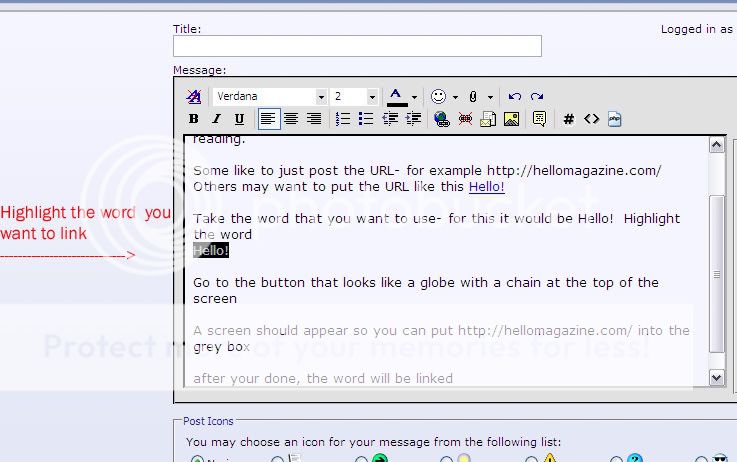
A step by step on how to link using words- hopefully this will help somewhat.

- Some like to just post the URL- for example http://hellomagazine.com/ Others may want to put the URL like this Hello!

Take the word that you want to use- for this example I'll use Hello! - Highlight the word


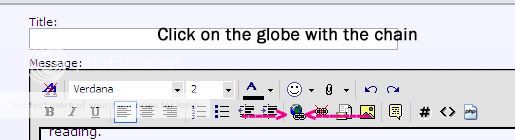
Go to the button that looks like a globe with a chain at the top of the screen


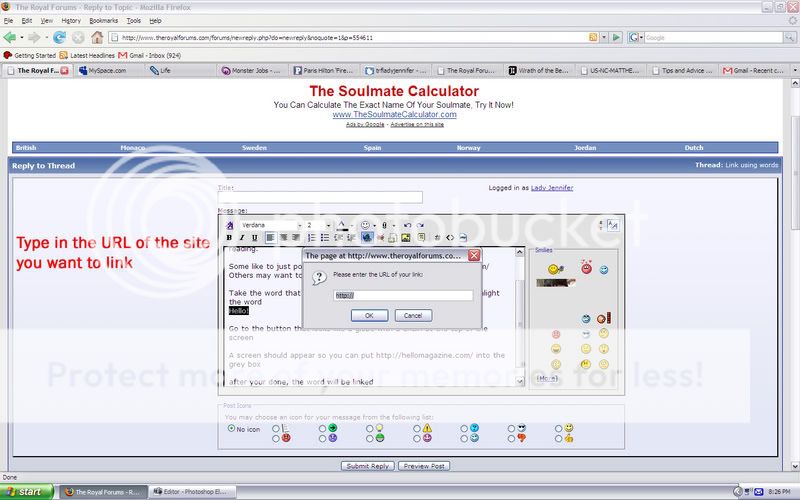
A screen should appear so you can put http://hellomagazine.com/ into the grey box


after your done, the word will be linked
__________________
TRF Rules & FAQ
"Life is a succession of moments. To live each one is to succeed." - Corita Kent

Live, Highlander. Grow stronger. Fight another day. Highlander: The Series

Reply With Quote
  #6  
Old 01-04-2007, 09:13 PM
RhapsodyBrat's Avatar
Serene Highness
 
Join Date: Feb 2006
Location: Cavite City, Philippines
Posts: 1,401
i've been longing to ask the same question...thanks Avalon and Lady Jennifer for the tips!
__________________
If a man does not keep pace with his companions, perhaps it is because he hears a different drummer.
Let him step to the music he hears, however measured or far away.
~Henry David Thoreau

RB is on Twitter and Tumblr!
Reply With Quote
  #7  
Old 01-05-2007, 09:33 AM
Tosca's Avatar
Heir Apparent
 
Join Date: Apr 2004
Location: Somewhere in the middle of the River Po Valley, Italy
Posts: 3,521
Quote:
Originally Posted by RhapsodyBrat
i've been longing to ask the same question...thanks Avalon and Lady Jennifer for the tips!
They must have read also my mind.

Thanks a lot, kids!
__________________
Forza Emilia!!! You'll rise again from the rubble soon!

Ciao Sic. We'll be missing you.
Reply With Quote
  #8  
Old 01-05-2007, 11:13 PM
Elspeth's Avatar
Imperial Majesty
 
Join Date: Jan 2004
Location: ***, United States
Posts: 16,900
Quote:
Originally Posted by Oppie
Not sure if I can explain this right but how can I make the link in my sig line be in words rather than www.blahblah.....

Like the mods have with the Forum Rules ?
We have these special powers, you see...
Reply With Quote
  #9  
Old 01-07-2007, 10:48 AM
Oppie's Avatar
Courtier
 
Join Date: Jun 2005
Location: Ottawa, Canada
Posts: 538
Quote:
We have these special powers, you see...
Oh I know you do, oh great ! closer of threads and mergers of posts.

I must have tried to ask this question four or five times, but I couldn't figure out how to ask it, at one point the title line just said ELSPETH POST HERE ! so I could copy your post and ask how do you do that.

I have to say though, I went out and I guess I left this thread open, came home at 3am a tad tipsy. I think I stared at Lady Jennifer post for about half an hour, I could not understand what was going on.
__________________
Like a pirate map, but way cooler.

Map for the British Royals
Reply With Quote
  #10  
Old 01-07-2007, 11:00 AM
Lady Jennifer's Avatar
Super Moderator
 
Join Date: Apr 2005
Location: Down the street. It's the third house on the right, United States
Posts: 7,643
Quote:
Originally Posted by Oppie
I have to say though, I went out and I guess I left this thread open, came home at 3am a tad tipsy. I think I stared at Lady Jennifer post for about half an hour, I could not understand what was going on.
Thanks for that chuckle Oppie. I've done that before myself- not with this forum, but other sites....
__________________
TRF Rules & FAQ
"Life is a succession of moments. To live each one is to succeed." - Corita Kent

Live, Highlander. Grow stronger. Fight another day. Highlander: The Series

Reply With Quote
  #11  
Old 02-16-2007, 10:03 AM
Tosca's Avatar
Heir Apparent
 
Join Date: Apr 2004
Location: Somewhere in the middle of the River Po Valley, Italy
Posts: 3,521
I've been trying to make a link by using words, but each time I click on the icon with the chain, all I can get is a blank window that opens for me.
Can anyone explain what's going on, please? Is it my computer???
Thanks!!!
__________________
Forza Emilia!!! You'll rise again from the rubble soon!

Ciao Sic. We'll be missing you.
Reply With Quote
  #12  
Old 02-16-2007, 11:25 AM
Avalon's Avatar
Heir Apparent
 
Join Date: Nov 2005
Location: Yerevan, Armenia
Posts: 5,913
Quote:
Originally Posted by Tosca
I've been trying to make a link by using words, but each time I click on the icon with the chain, all I can get is a blank window that opens for me.
Can anyone explain what's going on, please? Is it my computer???
Thanks!!!
Before clicking on the chain icon, you must highlight the word you want to make linked. After that click the chain icon. You will get the blank window, where you must insert there the URL address (the link).
And have a look at Lady Jennifer's post (the last picture she posted shows that blank window and what you must do).

Hope this helps.
__________________
Queen Elizabeth: "I cannot lead you into battle, I do not give you laws or administer justice but I can do something else, I can give you my heart and my devotion to these old islands and to all the peoples of our brotherhood of nations." God, Save The Queen!
Reply With Quote
  #13  
Old 02-16-2007, 02:59 PM
Aristocracy
 
Join Date: Nov 2005
Location: chandler, United States
Posts: 147
I have a question: how and what steps that I need to do to "quote" someome message?

Please help! Thank you in advance
Reply With Quote
  #14  
Old 02-16-2007, 05:40 PM
Lady Jennifer's Avatar
Super Moderator
 
Join Date: Apr 2005
Location: Down the street. It's the third house on the right, United States
Posts: 7,643
Quote:
Originally Posted by kimlan
I have a question: how and what steps that I need to do to "quote" someome message?

Please help! Thank you in advance
You can do it 3 ways
Type in this:
["QUOTE"][/"QUOTE"]
But remove the "" marks that are around the Quote
Or use the button that looks like a bubble that you would see on a cartoon. Its the 4th button from the end on the right side (when you use the Post reply button. If you do a quick reply its the last button- next to the insert image button)
The 3rd way- which I forgot to include in this thread is when you want to quote a member there should be a quote button in the person's post.
__________________
TRF Rules & FAQ
"Life is a succession of moments. To live each one is to succeed." - Corita Kent

Live, Highlander. Grow stronger. Fight another day. Highlander: The Series

Reply With Quote
  #15  
Old 02-16-2007, 09:13 PM
Aristocracy
 
Join Date: Nov 2005
Location: chandler, United States
Posts: 147
Thank you very much Lady Jennifer!
Reply With Quote
  #16  
Old 02-17-2007, 11:42 AM
Tosca's Avatar
Heir Apparent
 
Join Date: Apr 2004
Location: Somewhere in the middle of the River Po Valley, Italy
Posts: 3,521
Quote:
Originally Posted by Avalon
Before clicking on the chain icon, you must highlight the word you want to make linked. After that click the chain icon. You will get the blank window, where you must insert there the URL address (the link).
And have a look at Lady Jennifer's post (the last picture she posted shows that blank window and what you must do).

Hope this helps.
Avalon, I always highlight the words before clicking on the icon, but what appears is a completely blank window.
Thanks, anyway!
__________________
Forza Emilia!!! You'll rise again from the rubble soon!

Ciao Sic. We'll be missing you.
Reply With Quote
  #17  
Old 02-19-2007, 05:49 PM
LadyMacAlpine's Avatar
Heir Presumptive
 
Join Date: Sep 2004
Location: *****, United States
Posts: 2,250
Quote:
Originally Posted by Tosca
Avalon, I always highlight the words before clicking on the icon, but what appears is a completely blank window.
Thanks, anyway!
When I was posting photo's I wasn't able to make it work either with a moderator's instructions.
__________________
Reply With Quote
  #18  
Old 02-20-2007, 12:30 AM
Sister Morphine's Avatar
Heir Presumptive
 
Join Date: Dec 2005
Location: North Carolina, United States
Posts: 2,691
Quote:
Originally Posted by Tosca
Avalon, I always highlight the words before clicking on the icon, but what appears is a completely blank window.
Thanks, anyway!
So you don't get the box that tells you to type in the address? In that case, just do this:


[ url="http://www.yahoo.com" ]Yahoo[ /url ]


The word(s) in between the tags will be linked to the site in the tags. Just eliminate the spaces in the brackets.
__________________
"The grass was greener / The light was brighter / The taste was sweeter / The nights of wonder / With friends surrounded / The dawn mist glowing / The water flowing / The endless river / Forever and ever........ "
Reply With Quote
  #19  
Old 09-27-2010, 11:27 AM
Lumutqueen's Avatar
Imperial Majesty
Royal Blogger
 
Join Date: Aug 2007
Location: Carlton, York, United Kingdom
Posts: 15,613
When you post a link to one of the Fashion threads when your trying to show other members the outfit of a royal. How do you change the name of the link so that it says "Full View" or "Close Up" etc?
__________________
We Will Remember Them.
Reply With Quote
  #20  
Old 09-27-2010, 12:19 PM
dazzling's Avatar
Super Moderator
Blog Editor
Royal Blogger
Picture of the Month Assistant Coordinator
 
Join Date: Jul 2004
Location: -, France
Posts: 16,399
Quote:
Originally Posted by Lumutqueen View Post
When you post a link to one of the Fashion threads when your trying to show other members the outfit of a royal. How do you change the name of the link so that it says "Full View" or "Close Up" etc?
Type the word you want to be linked. So if you want to a a link to Full View -
1. type the word
2. highlight it
3. Click on the insert link button (the blue ball on the format area) & paste your link & click ok.

Reply With Quote
Reply


Currently Active Users Viewing This Thread: 2 (0 members and 2 guests)
 
Thread Tools Search this Thread
Search this Thread:

Advanced Search
Display Modes

Posting Rules
You may not post new threads
You may not post replies
You may not post attachments
You may not edit your posts

BB code is On
Smilies are On
[IMG] code is On
HTML code is Off
Trackbacks are Off
Pingbacks are Off
Refbacks are Off


Similar Threads
Thread Thread Starter Forum Replies Last Post
Never-changing Hairstyles Her_Majesty Royal Style File 64 03-05-2012 07:39 AM
Changing the constitution? Dennism Royal Family of Spain 0 04-16-2004 10:39 PM


Additional Links
Popular Tags
2013 abdication beatrix birthday british royals camilla chris o'neill countess crown prince frederik crown princess letizia crown princess mary crown princess mette-marit crown princess victoria current events danish royals daytime fashion duchess of cambridge enthronement fashion france funeral guillaume habsburg hereditary grand duke inauguration kate middleton king king abdullah king willem-alexander lannoy luxembourg maxima norway official visit pieter van vollenhoven prince prince carl philip prince constantijn prince daniel prince henrik prince joachim prince of orange princess princess beatrix princess christina of the netherlands princess haya princess laurentien princess letizia princess mabel princess madeleine princess margriet princess marie princess mary princess maxima prince willem-alexander prince william queen queen beatrix queen maxima queen rania queen silvia royal wedding sheikh sheikh mohammed state visit stephanie the netherlands victoria (1977 -) wedding willem-alexander


Our Communities

Our communities encompass many different hobbies and interests, but each one is built on friendly, intelligent membership.

» More about our Communities

Automotive Communities

Our Automotive communities encompass many different makes and models. From U.S. domestics to European Saloons.

» More about our Automotive Communities

RV & Travel Trailer Communities

Our RV & Travel Trailer sites encompasses virtually all types of Recreational Vehicles, from brand-specific to general RV communities.

» More about our RV Communities

Marine Communities

Our Marine websites focus on Cruising and Sailing Vessels, including forums and the largest cruising Wiki project on the web today.

» More about our Marine Communities


Copyright 2002-2012 Social Knowledge, LLC All Rights Reserved.

All times are GMT -4. The time now is 01:35 PM.

Social Knowledge Networks

eXTReMe Tracker
Powered by vBulletin
Copyright ©2000 - 2013
Jelsoft Enterprises

Royal News Delivered to your Email!

You can get the latest Royal News right in your inbox.

unsusbcribe at anytime with one click

Close [X]